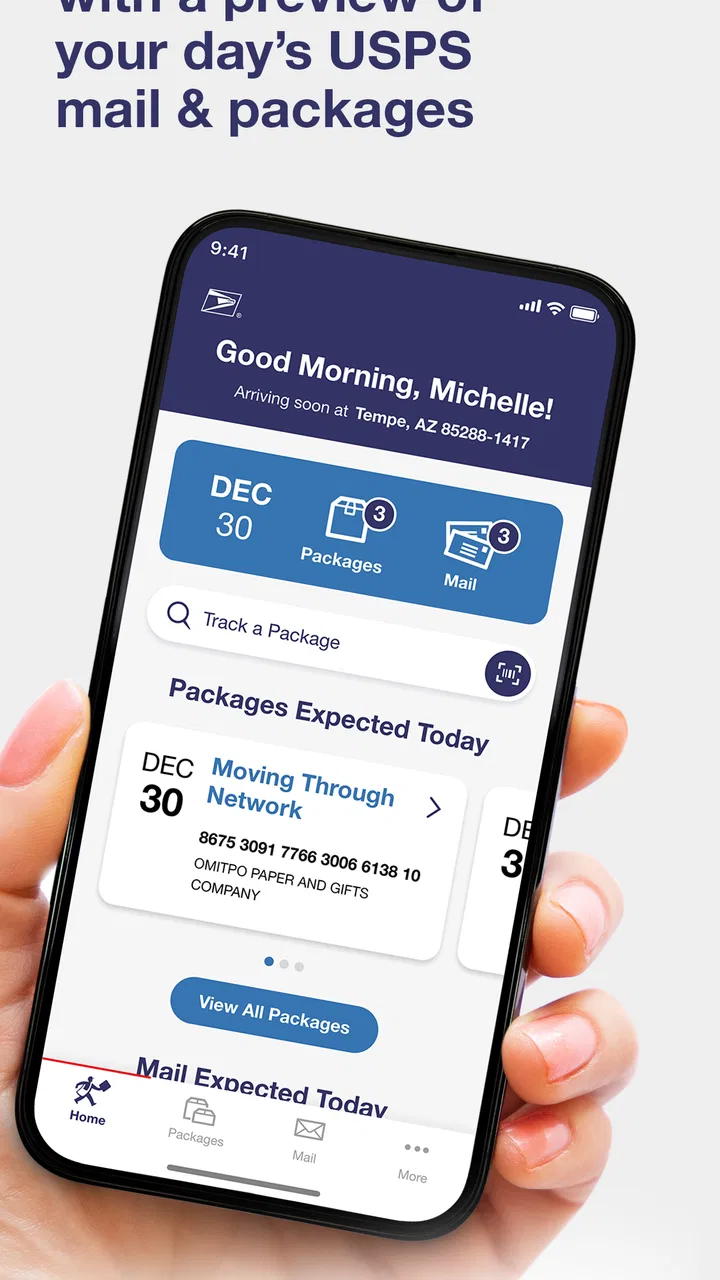
Informed Delivery® Mobile
- 4.7
- Rating
- 500.00K
- Installs
- Free
- Price

 Analysis by App-foxy
I found Informed Delivery® Mobile most useful when I stopped thinking of it as a general shopping or delivery app and treated it as a household mailbox companion. Its purpose is simple: it lets you view USPS mail and packages in one place, which can save time when several people share an address or when nobody wants to check the physical mailbox repeatedly. The app comes from United States Postal Service®, is free, and is aimed at an Everyone audience.
That simplicity is also the key to judging it fairly. This is not a replacement for every USPS service, a universal parcel tracker, or a shared family organizer. It is a focused business app built around Informed Delivery. In my experience, its value depends less on how many buttons it has and more on whether the people in a household agree about who checks the information, who collects deliveries, and how much account access should be shared.
How Informed Delivery® Mobile fits into a shared household
When I think about using Informed Delivery® Mobile in a shared household, the key question is not just who can check incoming USPS items, but how the household turns that information into a clear handoff. I’d agree on one account holder and a simple way to notify the person who needs to know, rather than making a shared device the default. That keeps the routine useful while leaving room to consider where shared access can become uncomfortable.
You May Also Like

 Blood Strike: 2.5 Anniversary
Blood Strike’s Loadouts Turn Every Drop Into a Tactical Gamble
A close look at Blood Strike’s custom loadouts: how fast access to signature weapons reshapes its battle royale rhythm, rewards preparation, and narrows the gap between fights.

 Pandora - Music & Podcasts
Pandora’s Music Is Easy to Start, but Harder to Recover
Pandora’s strength is its low-effort path from a seed to a station. Its weak spot is how much confidence it asks you to place in connection, setup, and quiet recovery.

 8 Ball Pool
 Is Built on Rivalries, Rematches, and Routine
A close look at the rivalries, rematches, shared routines, and unanswered safety questions that turn a quick pool match into a persistent mobile community.

 Samsung Music
’s Quiet Strength Is Playing What You Already Own
Its reach comes less from spectacle than from dependable access to a personal library. That simplicity is both the app’s strongest retention engine and its ceiling.

 AccuWeather: Weather Radar
AccuWeather Review: A Quick, Clear Forecast for Everyday Decisions
For everyday plans, the best forecast is the one you can understand quickly. AccuWeather makes rain timing, radar, and local conditions easy to act on, with a few trade-offs.

 Hill Climb Racing
Why Hill Climb Racing Still Turns Crashes Into One More Run
A tiny car, a bumpy hill and one more upgrade: Hill Climb Racing keeps resurfacing because its simple chaos makes every near-miss feel personal.
More From Our News Desk



A practical mailbox routine for more than one person
Imagine a home where one person works away from the house, another handles errands, and a third person is waiting for an important letter. Instead of relying on a quick message such as “Did anything arrive?”, the household can use the app to check the USPS mail and package information available through the service. That makes it easier to coordinate ordinary tasks without turning every delivery into a conversation.
I can see this being especially useful for roommates, couples, adult children living with parents, or anyone who manages household errands for someone else. A person who leaves early can check the mail information before heading out. Someone working from home can decide whether a mailbox trip is worthwhile. A household member expecting a package can at least understand that the delivery should be part of the day’s planning rather than discovering it by accident later.
The important distinction is that the app helps people see USPS mail and packages; it does not automatically solve the household’s responsibilities. Seeing an item does not tell everyone who should retrieve it, where it should be placed, or whether it belongs to the person who noticed it first. I would use it as a prompt for coordination, not as a substitute for a shared household agreement.
That makes the app less exciting than a full delivery-management platform, but also easier to understand. Its narrow purpose can be an advantage when the main problem is uncertainty around incoming USPS items. If your home receives packages from many carriers and you want one combined timeline, a broader tracking service may fit better. If USPS is the carrier that matters most to your household, this focused approach is more relevant.
What the app changed in my everyday workflow
My preferred routine would be to check the app at a natural point in the day rather than constantly refreshing it. For example, before leaving for work, I could look for mail or packages that might affect the evening routine. If something appears relevant to another household member, I could send a short message with the useful detail instead of forwarding account access.
That small habit matters because shared devices can blur personal boundaries. A tablet in a kitchen or a phone passed between relatives may be convenient, but convenience does not mean every person should use the same signed-in session. I would keep the account holder’s access on their own device and share only the practical information needed for coordination.
There is also a useful trade-off here: the app can reduce unnecessary trips to the mailbox, but it may encourage people to treat digital information as a guarantee. I would still check the physical mailbox when the item is important, and I would avoid promising another person that a letter or package is ready solely because it appears in the app. Digital visibility and physical arrival are related, but they are not the same household event.
Setting it up without creating account confusion
Because this app connects to USPS mail and package information, I would begin with the person whose address and account relationship are appropriate for the service. I would not install it on every family member’s phone first and try to work out ownership afterward. A cleaner setup is to decide who will maintain the account, which device is the primary one, and how the household will communicate useful updates.
This is particularly important on a shared phone or family tablet. If the device is used by children, guests, or roommates, leaving an account open can expose information intended for the account holder. The app has an Everyone content rating, but that describes the suitability of the app’s content, not an invitation to share account credentials casually. I would treat the account as personal even when the mailbox is shared.
Another sensible step is to establish expectations before relying on it. Does one person check the app each morning? Does the person who sees a package notify the recipient? Is the app only for awareness, while physical collection remains the recipient’s responsibility? These questions sound basic, yet answering them prevents the common problem where everyone assumes someone else has handled the delivery.
I also prefer a staged setup. First, I would install the app on the account holder’s device and confirm that the normal viewing routine makes sense. Then I would decide whether anyone else needs occasional information. Sharing a screenshot or a short message is often safer and clearer than handing over the entire account. This is one of the app’s less obvious household considerations: the technical setup may be quick, but the social setup determines whether it actually helps.
Coordinating packages and mail without over-sharing
For a household, the most useful workflow is selective coordination. If a package belongs to one person, that person needs to know it is coming, but everyone else may not need access to the complete account view. If a letter is addressed to someone else, I would avoid opening, photographing, or distributing its contents. The app can support awareness about incoming items without changing the privacy expectations around physical mail.
This is where I think a shared-device strategy can go wrong. A family may install the app on a central tablet because everyone uses it, but that can turn a practical tool into an open window onto another person’s deliveries. I would rather keep the app attached to one responsible account holder and use ordinary household messages for coordination. That arrangement is less convenient than a fully shared dashboard, but it respects personal boundaries.
For roommates, the boundary is even more important. A shared address does not necessarily mean shared mail information. I would agree on whether the app is for one person’s use only or whether specific delivery notices may be passed along. If the household cannot agree on that point, I would skip shared access and keep the app private.
There is a second coordination tip I found valuable: use the app to plan attention, not to create pressure. A person who is away from home may appreciate knowing that a package is expected, while someone at home may not be able to retrieve it immediately. A quick message such as “Please check when convenient” is more realistic than treating the app as a live household alarm. The tool works best when it supports a routine rather than demanding constant responses.
What account boundaries mean in real life
Informed Delivery® Mobile is best understood through the account holder’s perspective. The person who signs in should know what information is being viewed and should be comfortable with the device used for access. I would not use a shared login as a shortcut for family coordination, especially where roommates, visiting relatives, or older children use the same hardware.
That does not make the app unsuitable for families. It simply means the family should separate access from communication. One adult can manage the account while other household members receive only the information relevant to them. This arrangement is particularly sensible when a child is waiting for a birthday package or school-related item: the child can be told that something is expected without being given control of an adult’s account.
The Everyone age rating makes the app approachable for a broad audience, but age suitability and account responsibility are different issues. I would be comfortable explaining the app’s purpose to a teenager, yet I would still keep the account under the supervision of the person responsible for the household address and mail. For younger children, the app is more useful as an adult-managed source of information than as an independent tool.
Trust also matters between adults. If one person manages household mail for an older relative, the app may make coordination easier, but the arrangement should be transparent. I would explain what is being checked, why it is being checked, and which information will be shared. That approach avoids turning a convenience feature into silent monitoring.
Where the focused USPS approach works better
Compared with checking the mailbox blindly, the app offers a clearer starting point for planning. Compared with opening the USPS website in a browser every time, a mobile app can feel more natural for quick checks. The dedicated format also makes sense for people who mainly care about USPS rather than every possible carrier.
On the other hand, a browser may be preferable for someone who rarely checks mail information and does not want another app installed. A multi-carrier tracking app may be better for an online shopper whose deliveries arrive through several postal and private services. A household calendar or messaging group may still be necessary for assigning pickup duties, because viewing incoming items is not the same as managing chores.
I would also avoid expecting it to replace direct communication with USPS when a delivery problem needs attention. The app is useful for visibility, but a person dealing with a missing, delayed, damaged, or incorrectly addressed item may need a different USPS channel or a conversation with the sender. This is an important limitation: the app can improve awareness without resolving every postal issue.
Its current version is 1.0.0, so I approach it as a young, focused mobile product rather than a mature household command center. That does not make it a poor choice, but it does reinforce my advice to keep expectations modest. Install it for the viewing task it is designed to support, then use other tools for calendars, conversations, carrier coverage, or household task assignment.
Performance expectations and who should skip it
The app has an average rating of 4.3 from around 235 ratings, with roughly 94 written reviews, and it has passed 100 thousand installs. Those figures suggest that many people find the basic idea useful, while the written feedback is still a relatively small window into every possible household situation. I would read the rating as encouragement to try it, not proof that it will fit every address, device, or routine.
It is free, which removes the biggest barrier to testing it. Still, “free” does not remove the need to decide whether the app earns a place on your phone. If you do not use USPS often, have no reason to view incoming mail digitally, or already have a routine that works well, the extra app may add little. Someone who wants a single screen for Amazon, courier, and postal deliveries should probably choose a broader solution instead.
I would also skip it as a shared household tool if the people involved cannot maintain clear account boundaries. The app may be perfectly reasonable for one person but awkward for a group that expects every member to have equal access. In that case, the problem is not necessarily the app itself; it is a mismatch between a personal account workflow and a household’s expectations.
For people who need a simple way to check USPS-related information and prefer using a phone, the low financial cost makes experimentation easy. My advice would be to install it on the primary user’s device, use it for a normal week, and then decide whether it genuinely reduces mailbox uncertainty. If it does not change your routine, uninstalling it is more sensible than forcing it into a role it was not built to fill.
My household verdict
I like Informed Delivery® Mobile because its purpose is easy to grasp and its free entry point makes it accessible. Developed by United States Postal Service®, it belongs in the business category, runs on devices using Android 8.0 or later, and carries an Everyone age rating. Those details make it approachable for many households, but the real question is whether its focused USPS view matches the way your home handles mail.
My strongest recommendation is for a household with one clear account holder and a simple communication routine. That could be a couple sharing delivery responsibilities, an adult helping an older relative, or roommates who have explicitly agreed on what information may be passed along. In each case, the app works as a useful visibility layer while ordinary messages handle the human part of coordination.
I would be more cautious about installing it on a communal device or giving children unrestricted access. The app can be suitable for an Everyone audience while the account information still deserves adult judgment and personal boundaries. Keeping the login private, sharing only relevant updates, and remembering that digital mail visibility is not a delivery guarantee are the three habits I would carry into daily use.
Overall, I see this as a practical USPS companion rather than a complete household delivery system. Its best quality is focused awareness, not all-in-one management. If that is the gap you want to fill, I would recommend trying it. If you need multi-carrier tracking, shared task assignment, or a full family dashboard, I would choose a different tool and keep this app only if USPS visibility remains valuable on its own.
FAQs for Informed Delivery® Mobile
01What is Informed Delivery® Mobile and how does it work?
Informed Delivery® Mobile is a convenient app provided by the United States Postal Service (USPS) that allows users to preview their incoming mail and manage packages. By creating an account, users can view grayscale images of the exterior of their letter-sized mailpieces and track their packages right from their smartphones. This app provides enhanced mail visibility and accessibility.
02Is Informed Delivery® Mobile available for both Android and iOS devices?
Yes, Informed Delivery® Mobile is available for download on both Android and iOS platforms. Users can easily find it on the Google Play Store for Android devices and the App Store for iOS devices. This cross-platform availability ensures that users can access their mail details regardless of their smartphone choice.
03Are there any security concerns with using Informed Delivery® Mobile?
The app is designed with privacy and security in mind, using encryption to protect user data. However, users should ensure they use strong passwords and maintain the security of their email accounts linked to the service. It’s also recommended to regularly update the app to benefit from the latest security enhancements.
04What are the main benefits of using Informed Delivery® Mobile?
The app offers several benefits, including the ability to preview mail before it arrives, track packages, and manage delivery notifications. This can be particularly useful for individuals who travel frequently or manage business mail. By providing early visibility, users can plan for important deliveries and reduce the risk of missed mail.
05Are there any limitations to using Informed Delivery® Mobile?
While Informed Delivery® Mobile is a powerful tool, it has some limitations. The app only shows images of letter-sized mail and does not include images of larger mailpieces or packages. Additionally, the service is currently only available to residential addresses and certain business addresses within the United States. Users should check service availability in their area.
Pros
- Provides real-time mail notifications.
- User-friendly interface and easy navigation.
- Secure login with multi-factor authentication.
- Free to use with no hidden fees.
- Helps track packages and deliveries easily.
Cons
- Limited to USPS deliveries only.
- Occasional delays in mail updates.
- Requires a stable internet connection.
- Not available in all regions.
- No customization for notification settings.

Informed Delivery® Mobile
Gallery